The plan is in one file, what happened is somewhere else
The daily plan is built in a spreadsheet, then actual times go into a logbook. Reconciling the two becomes somebody’s month-end job.
Operations software for ATOs and general aviation
From flight planning to evaluation forms, from weight and balance to licence currency, everything a flight school records lives in one place. No more moving between spreadsheets, WhatsApp groups and paper sheets.
You build the plan and publish the rows; instructors and students see the same list in their own panel.
Turkish and English · Data stays in Türkiye · Setup and migration included
Sound familiar
Each part works on its own. The trouble starts between them — when an audit arrives, when a student asks how many hours they have flown, or when an instructor’s rating quietly expires.
The daily plan is built in a spreadsheet, then actual times go into a logbook. Reconciling the two becomes somebody’s month-end job.
How many minutes a student has logged against each exercise is collected page by page. “Is this student ready for the skill test?” requires arithmetic.
Medical, class rating, IR revalidation. An expired document is usually noticed on the flight day, not while the plan is being built.
The evaluation form is printed, signed, scanned and filed. To find out which stage a form is waiting at, someone opens the folder.
From the application
These are not mock-ups made for the website; they are the application’s own screens. Personal data has been replaced with sample data.
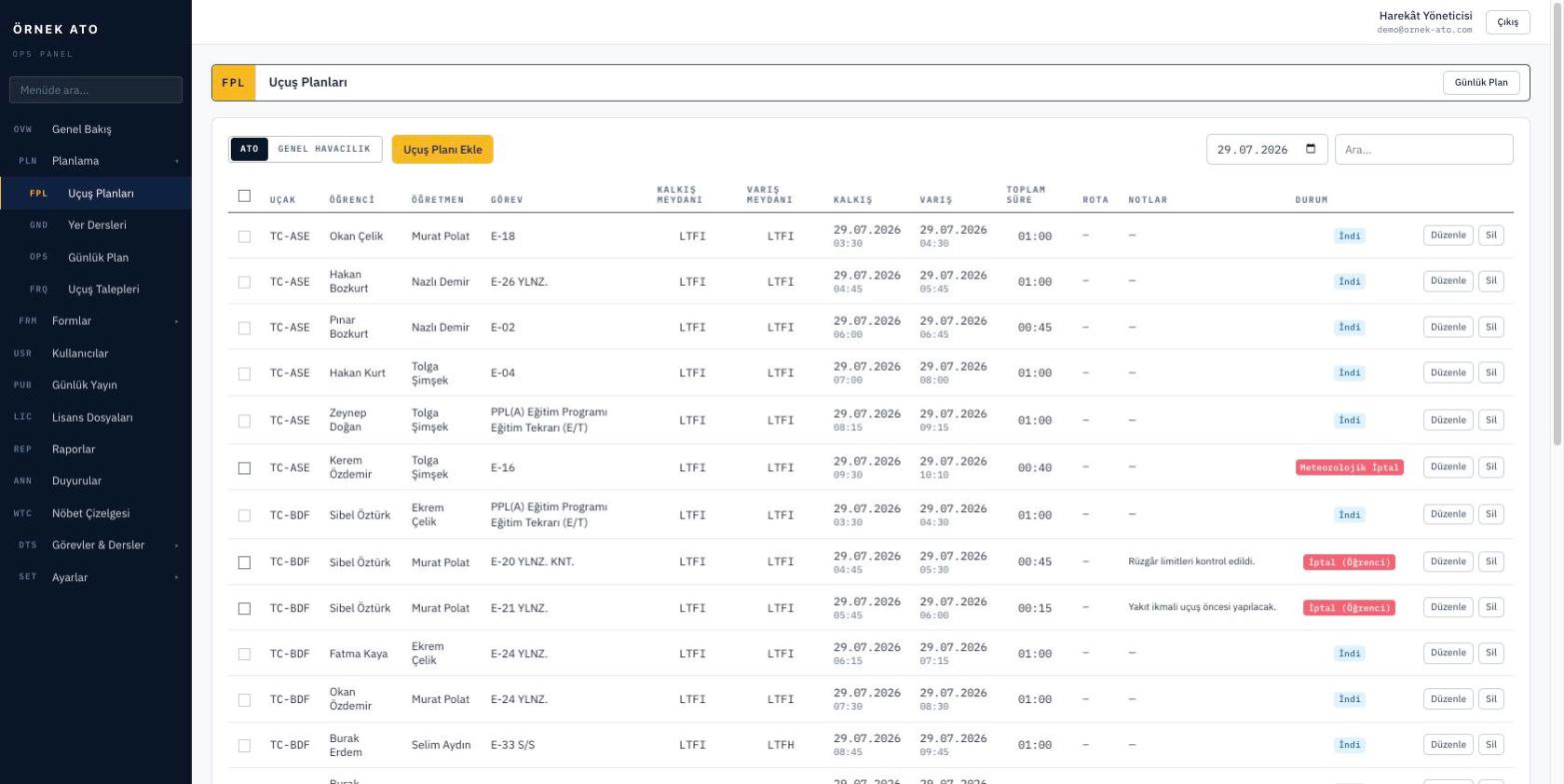
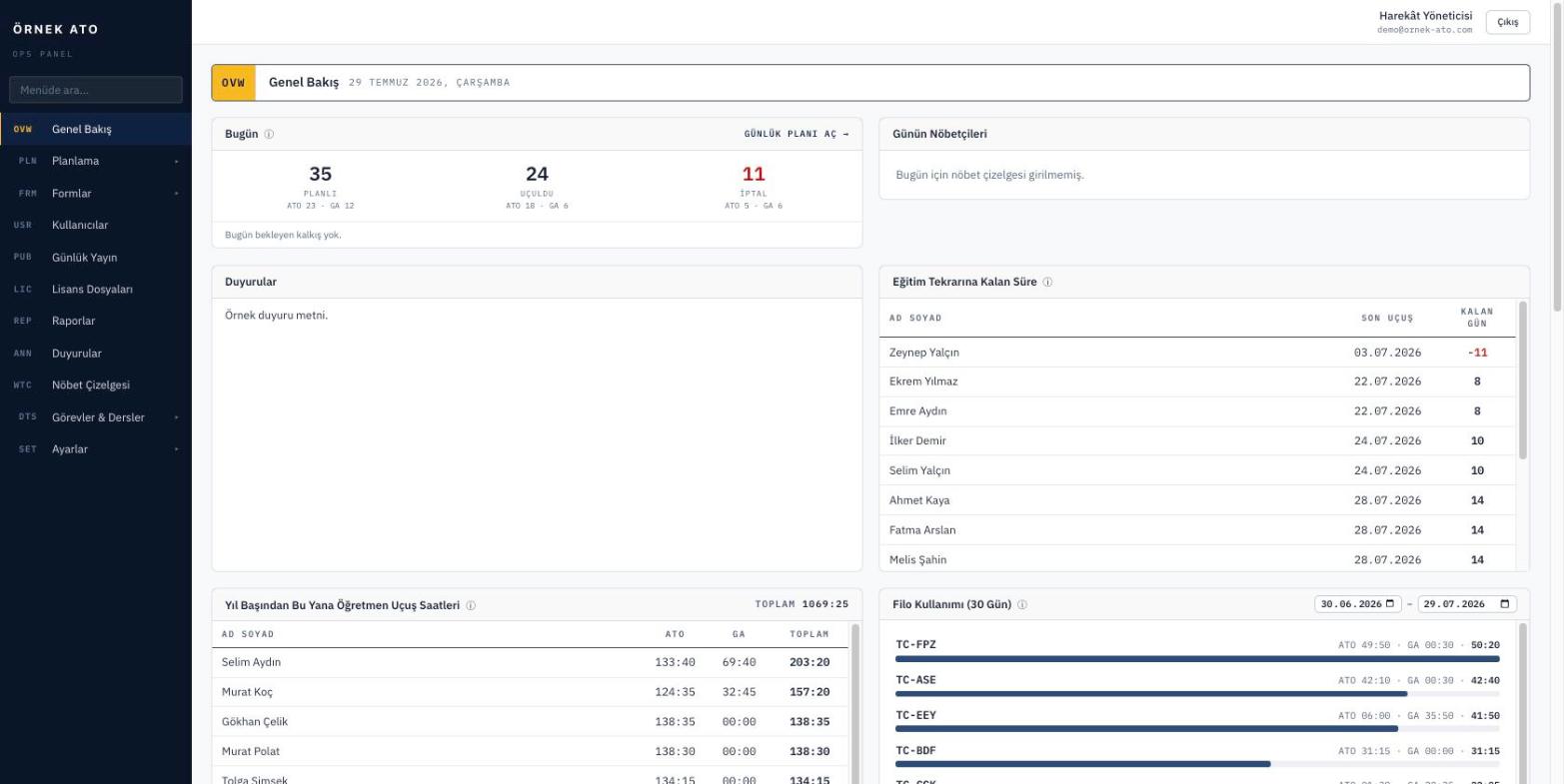
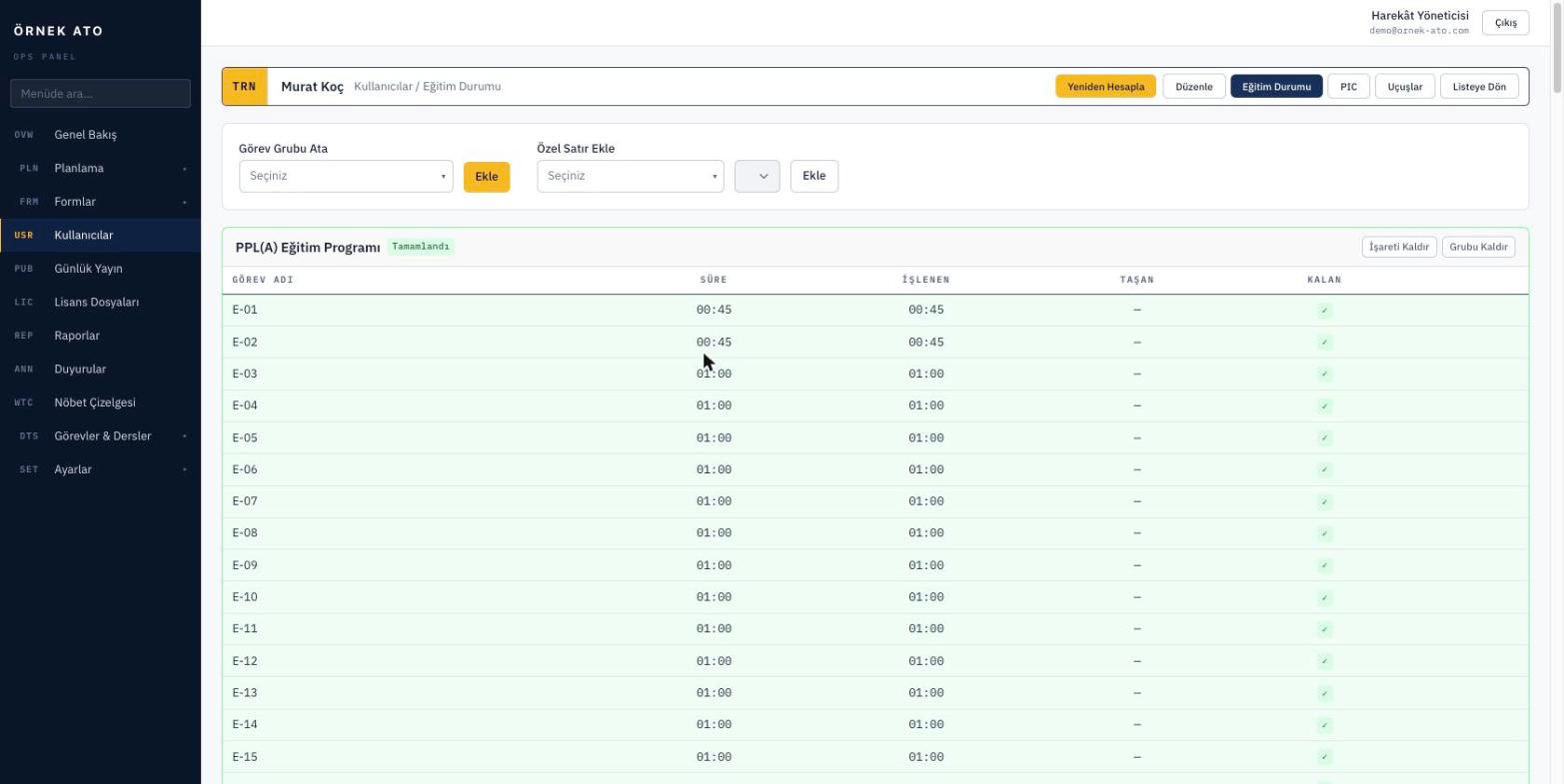
These are screenshots of the actual application; personal data has been replaced with sample data.
Scope
The modules are not separate products. They share the same aircraft, the same people and the same exercise records, so what you enter in one place is correct everywhere else.
The planning screen is more than a calendar. It knows where each student left off, which aircraft is cleared for the exercise and who is actually free at that hour.
ExploreYou define the syllabus once as exercise groups. Every completed flight posts its time to the right exercise and the student’s progress card updates itself.
ExploreItems, arms and envelope points are defined once per aircraft type. The instructor opening the form from a flight row only enters the load; the calculation and envelope check happen instantly.
ExploreYou are not stuck with a preset template. You define the fields, options and scoring, and attach them to exercises. After that the system watches: who filled it in, who approved it, which one is still waiting.
ExploreYou define a lesson catalogue and plan lessons with instructors and student groups. Attendance is recorded on screen and feeds directly into each student’s ground exercise progress.
ExploreThe fleet record is more than an inventory list. You define what each aircraft can be used for, and the planning screen narrows the options accordingly.
ExploreMedical, class ratings and instrument rating currency sit on each person’s card with the days remaining. Anyone expired cannot be put on a plan, and reminders go out for anything about to lapse.
ExploreReports are not separate work — they are another view of the same data. You choose the filters, see the result on screen and export to Excel if you need to.
ExploreIf nobody reads email, there is no point sending notifications there. Flight plans and reminders go out over WhatsApp, with templates you write yourself.
ExplorePermissions attach to roles rather than people, and roles are defined at screen and action level. Every change is written to the audit trail with its user and timestamp.
ExploreThe life of a flight
These six steps run in order and each one inherits the data from the one before. You never type the same thing twice.
Students mark the days they are available from their own panel. Requests land on the planning screen.
Pick a student and their last flight, next exercise and the aircraft cleared for it appear. Arrival time is calculated from the exercise duration.
Before saving, the system checks: is the medical valid, is the aircraft already booked in that window, is the instructor flying elsewhere, does the currency interval still hold.
You publish the day. Instructors and students see it in their own panel, and a WhatsApp notification goes out if you want one. Unpublished rows stay invisible.
After the flight, actual times are entered — the fields arrive pre-filled with the planned values, so you only correct them. Weight and balance and the evaluation form open from the same row.
The time posts to the student’s exercise balance, the form enters its approval chain, and the flight appears in reports and Excel exports. Who changed what and when stays in the audit trail.
Who sees what
Permissions are defined by role; a user only sees and edits what they are authorised for.
Audit and data
In flight school software the real question is not storing data, it is being able to account for it. Every change is kept with its user, timestamp and old and new values.
Plans, forms, licences, student records — every change is traceable.
Permissions are set per screen and per action, with no per-person exceptions.
Servers sit in a data centre in Türkiye, and you can export all of your data at any time.
Automatic backups are configured out of the box and can be sent to your own storage.
Resources
Compliance 3 min read
What an audit looks for is not a pile of documents but consistency between records. Six practical rules for keeping a flight school’s records permanently ready.
Migration 3 min read
Most software migrations drag on not for technical reasons but because the order is wrong. A day-by-day plan for a flight school to switch in two weeks.
Operations 3 min read
Most scheduling mistakes come not from carelessness but from checking in the wrong place. The five we see most often in flight schools, and how each is prevented.
We set up a demo account with your aircraft list and your syllabus. Build your own daily plan in it, then decide.
No setup fee, no commitment. We usually get back to you the same week.