Skip to content

Module 04

You design the form; the system tracks the approval chain.

You are not stuck with a preset template. You define the fields, options and scoring, and attach them to exercises. After that the system watches: who filled it in, who approved it, which one is still waiting.

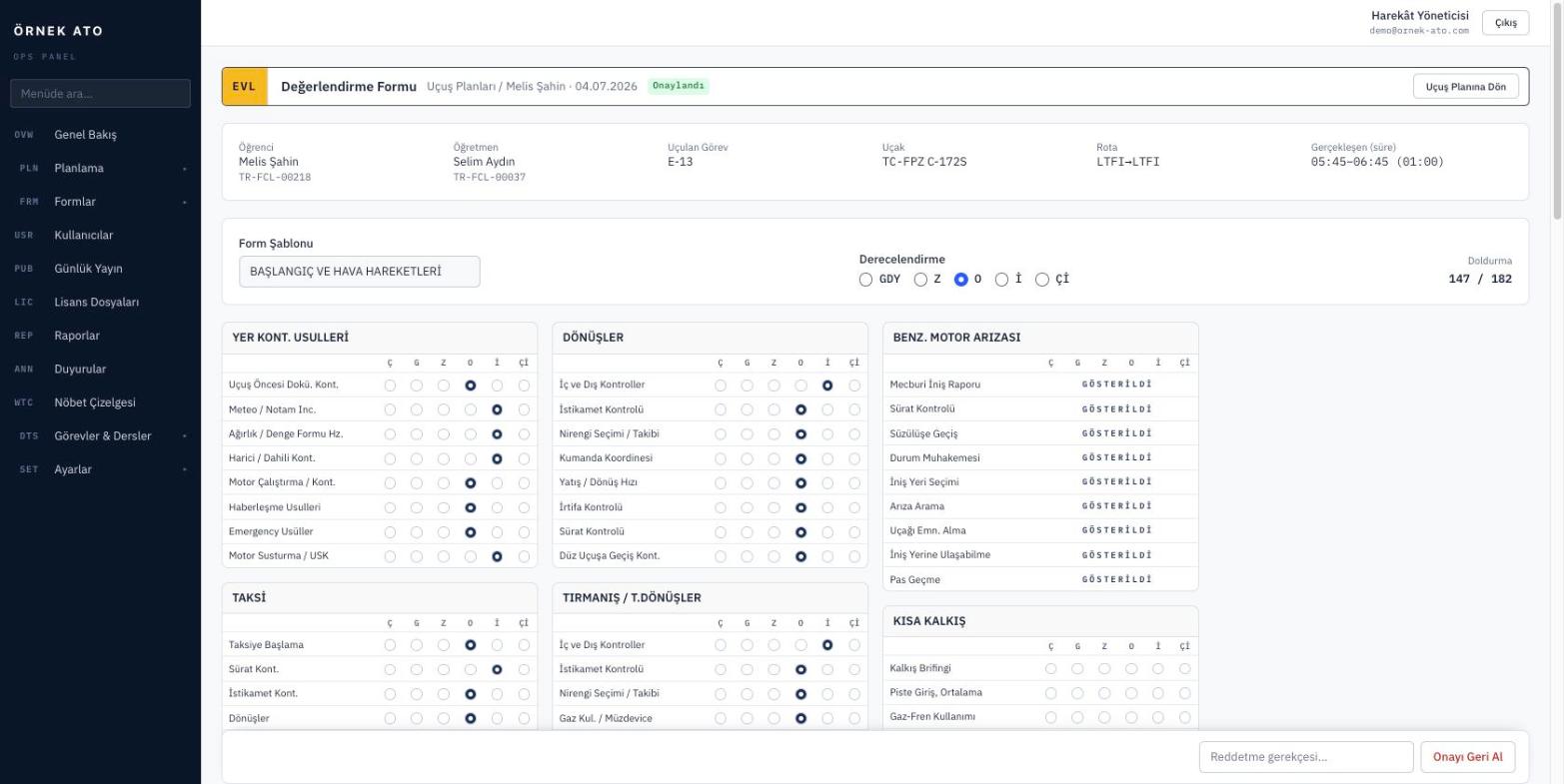
Screenshot from the application
An evaluation form: you design the fields, and the approval chain moves from fill-in to student approval to closure.

A field pool and form sheets

First you define the fields you use — scoring, select lists, free text, checkboxes. Then you bring those fields together into form sheets and order them. The same field can appear on more than one sheet.

  • Field types: score, select, text, checkbox
  • Option lists are managed separately and reused
  • Drag and drop ordering within a sheet

The approval chain moves on its own

The instructor fills the form in, the student sees and approves it from their panel, and the head of training closes it or returns it with a reason. Each stage is colour-coded in the list, so nobody has to ask where a form is stuck.

  • Instructor fill-in → student approval → management closure
  • The rejection reason stays on the record
  • Pending forms appear in the panel action box

Form selection follows the exercise

You define which form sheets apply to each exercise. After the flight, the instructor only sees the forms for that exercise, so filling in the wrong one is no longer possible.

  • Exercise to sheet mapping
  • Where no mapping exists, all sheets are selectable
  • Completed forms stay attached to the flight record

FAQ

Most asked

FAQ

Can we move our existing paper forms across?

Yes. Each line of your paper form becomes a field and is laid out on the sheet in the same order, and the printed output follows the same layout.

What happens if the student does not approve?

The form stays at that stage and appears in the pending list. You can also have automatic reminders sent to the student.

See it with your own data

We set up a demo account with your aircraft list and your syllabus. Build your own daily plan in it, then decide.

No setup fee, no commitment. We usually get back to you the same week.