Skip to content

Module 02

“Where is this student?” always has an answer on screen.

You define the syllabus once as exercise groups. Every completed flight posts its time to the right exercise and the student’s progress card updates itself.

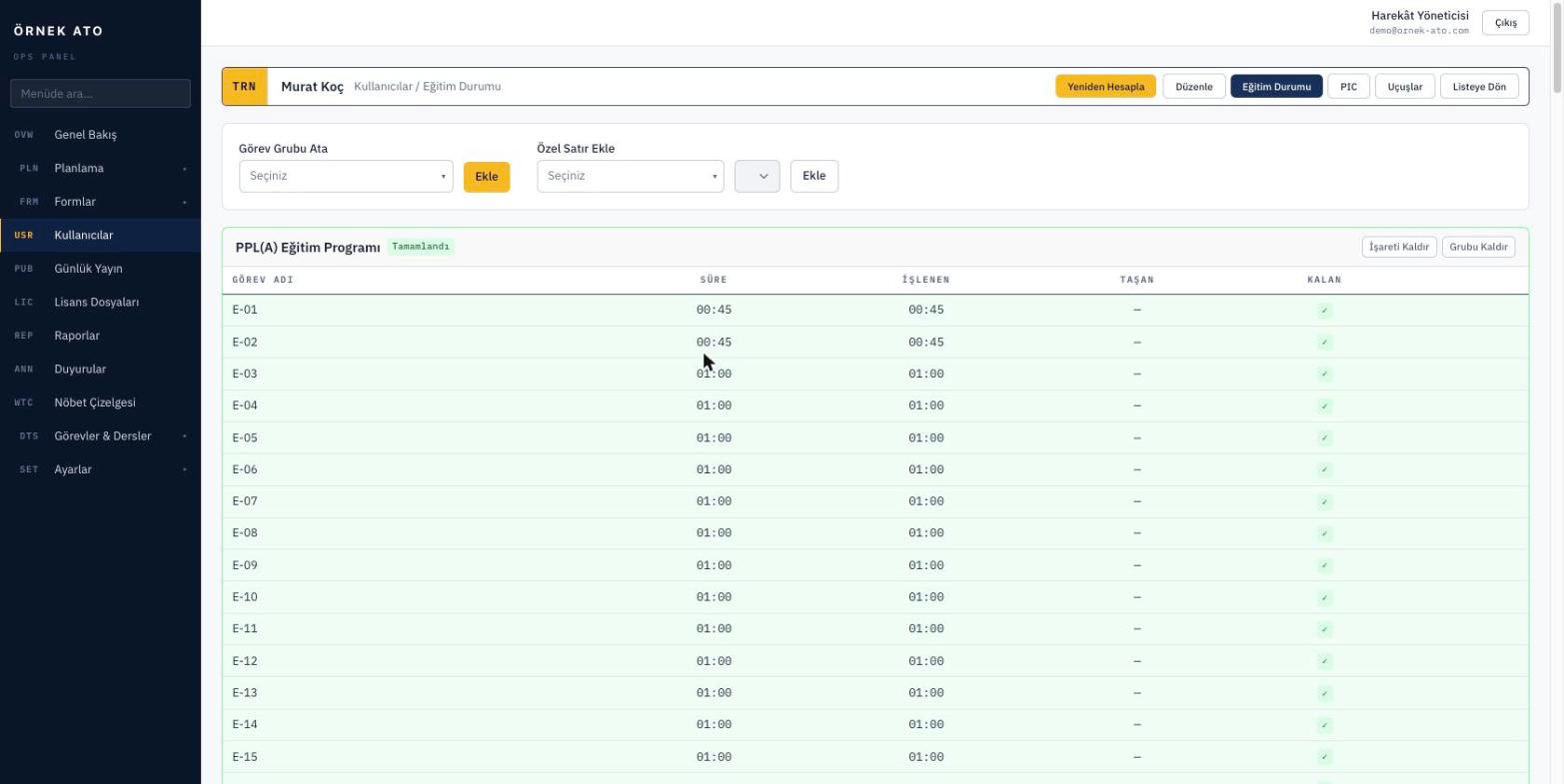
Screenshot from the application
A student’s exercise card: each group with its own progress, logged minutes and completion state together.

Build the syllabus once, apply it to everyone

Exercises are defined in groups: name, duration, ground or flight, repetition interval. Assign a group to a student and every exercise in it opens on their progress card.

  • Assign an entire exercise group in a single step
  • Flight exercises accumulate minutes; ground exercises close on instructor sign-off
  • Partly completed exercises carry their own badge

Special rows open by rule, not by habit

Progress check, revalidation and skill test rows can only be added when the group’s flags allow it. That stops off-syllabus rows appearing and records that cannot be explained in an audit.

  • Group flags decide which special rows may be opened
  • A special row with logged time cannot be deleted
  • Every addition and removal is written to the audit trail

Flight history and totals on one card

The student card brings together their profile, certificate dates, exercise progress, purchased PIC balance and full flight history. Totals are calculated separately for training and general aviation.

  • Training and PIC flights in separate tables with totals
  • Certificate expiry dates with days remaining
  • Students see the same information in their own panel

FAQ

Most asked

FAQ

How do ground exercises get completed?

Ground exercises do not accumulate minutes. An instructor marks them complete from the progress card, and when ground school attendance is recorded the related exercise is recalculated automatically.

If the syllabus changes, are existing students affected?

No. The syllabus is copied to the student card at assignment, so template changes do not alter past records — they apply only to future assignments.

See it with your own data

We set up a demo account with your aircraft list and your syllabus. Build your own daily plan in it, then decide.

No setup fee, no commitment. We usually get back to you the same week.