Skip to content

Module 01

The day’s plan is built on data, not recollection.

The planning screen is more than a calendar. It knows where each student left off, which aircraft is cleared for the exercise and who is actually free at that hour.

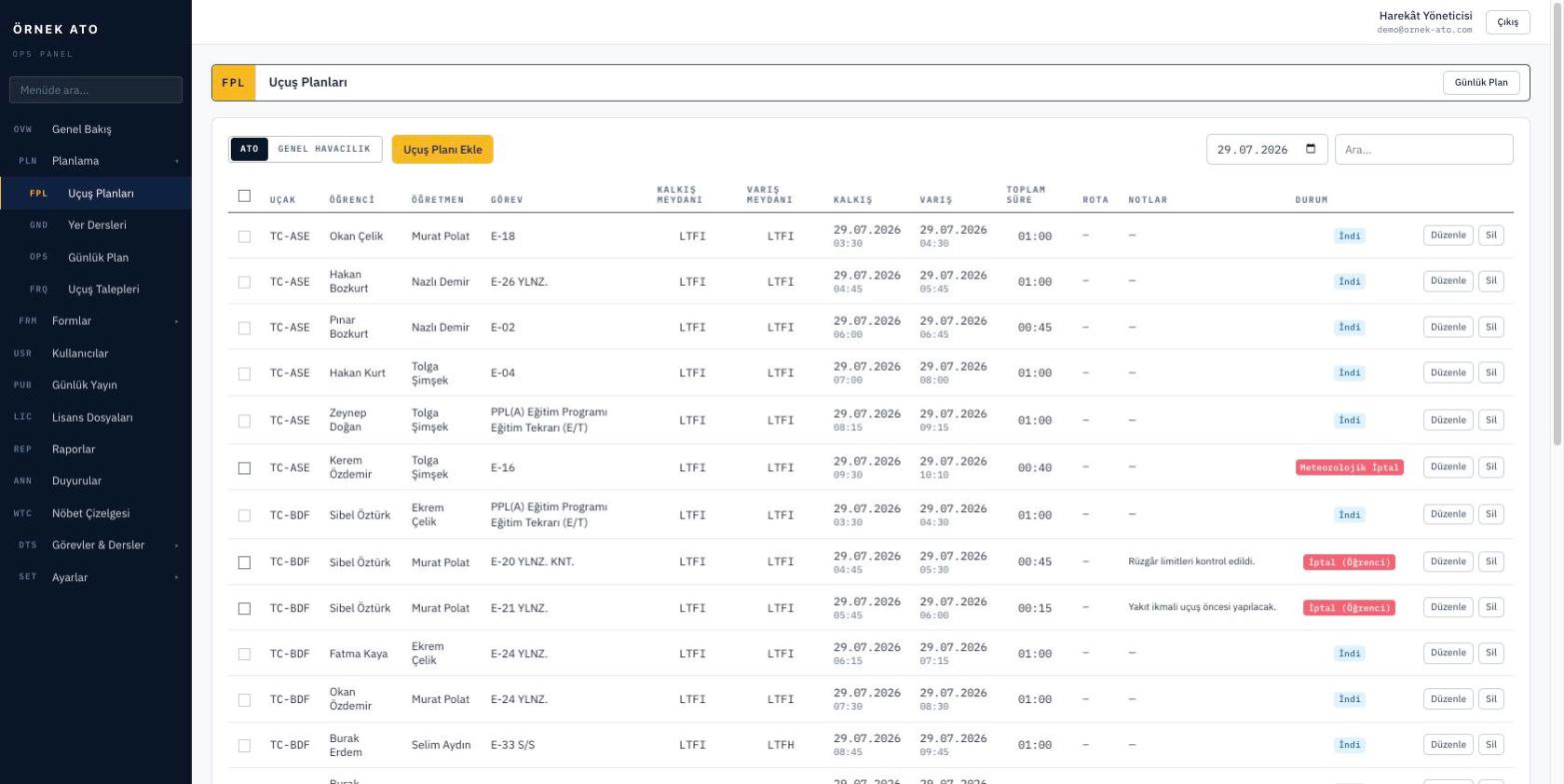
Screenshot from the application
The daily plan screen: rows are separated by status colour, unpublished ones stay as drafts, and the total duration shows in the header.

Pick the student, the rest arrives

The moment you choose a student, their last planned and last completed flight, the next exercise and the aircraft cleared for it are loaded. Choose the exercise and the arrival time is calculated from its standard duration.

  • The next exercise comes from syllabus progress, with nothing to track by hand
  • Students with an expired medical or rating cannot be selected, and the reason is shown in the row
  • Aircraft and tagged instructors are filtered to those suited to the exercise

See the conflict while saving, not on the flight day

Every save runs four checks and names whatever blocks it: is the aircraft booked in that window, is the instructor flying elsewhere at the same time, are the student’s documents valid, and does the gap since the last flight breach the currency interval.

  • Window conflict checks per aircraft and per person
  • Warning when days since the last flight exceed the exercise interval
  • Select multiple rows to assign status and notes in bulk

A published plan is the plan everyone sees

Draft rows stay with the planner. When you publish the day, instructors and students see the same list in their own panel and a WhatsApp notification can go out. Withdrawing a publication is just as quick.

  • Publish by day or by selected rows
  • Optional notification on publication
  • Total duration in the header, printable in the paper flight plan format

FAQ

Most asked

FAQ

Can two flights be booked on the same aircraft at the same time?

No. Window conflicts are checked per aircraft and per person at save time, and the conflicting row is rejected with a reason.

Can I print the daily plan?

Yes. A published day prints with registration, type, crew, exercise, departure, arrival, duration and route columns, with the duty and signature row underneath.

Can I plan general aviation (PIC) flights too?

Yes. PIC flights are planned separately from training flights. The student’s purchased hour balance shows on the planning screen and actual time is deducted from it.

See it with your own data

We set up a demo account with your aircraft list and your syllabus. Build your own daily plan in it, then decide.

No setup fee, no commitment. We usually get back to you the same week.